Adding MagBots to a Custom Environment#
In this tutorial, we show how to add two 6D-Platform MagBots to a custom environment. The very basic idea is that a MagBotSim parent class is chosen (see tutorial Choosing a Parent Class for Your Custom Environment for more information) and an instance of a specific MagBot class is initialized in the custom environment.
Getting Started#
First, we need to create a file for our custom environment. Navigate to the directory where your environment file should be
located and create a new file called magbot_example_env.py.
Initializing the Environment#
The next step is to decide which MagBotSim parent class is required (see tutorial Choosing a Parent Class for Your Custom Environment for more information).
To keep our example environment simple, we do not use RL. Thus, we choose the BasicMagBotEnv as the parent class.
Write the following code in magbot_example_env.py:
import numpy as np
import mujoco
from magbotsim import BasicMagBotEnv, SixDPlatformMagBotsAPM4330, MoverImpedanceController

class SixDPlatformMagBotExampleEnv(BasicMagBotEnv):
    """Simple example environment with two 6D-Platform MagBots."""

    def __init__(self) -> None:
        # mover parameters, collision parameters and initial start positions
        mover_mass = np.array([1.264] * 4)
        bumper_mass = np.array([0.05] * 4)
        mover_params = {
            'shape': 'mesh',
            'mesh': {'mover_stl_path': ['beckhoff_apm4330_mover'] * 4, 'bumper_stl_path': ['beckhoff_apm4330_bumper'] * 4},
            'mass': mover_mass - bumper_mass,
            'bumper_mass': bumper_mass,
        }
        # we model the mover as a simple 2D box to check collisions
        # since we are using Beckhoff XPlanar movers (APM4330), we
        # use the sizes specified in the technical drawings plus a safety margin
        collision_params = {'shape': 'box', 'size': np.array([[0.155 / 2, 0.155 / 2]] * 4) + 0.001}

        self.initial_mover_x_dist = 0.4027  # [m]
        self.initial_mover_start_xy_pos = np.array(
            [
                [0.36, 0.36],
                [0.36 + self.initial_mover_x_dist, 0.36],
                [1.1, 0.36],
                [1.1 + self.initial_mover_x_dist, 0.36],
            ]
        )
        self.initial_mover_z_pos = 0.001

        # MagBots
        self.num_magbots = 2 # <-- number of MagBots in this environment
        self.indices_mover_a = np.array([0, 2]) # <-- movers controlling the alpha rotation of the platforms
        self.indices_mover_b = np.array([1, 3]) # <-- movers controlling the beta rotation of the platforms

        # init BasicMagBotEnv
        super().__init__(
            layout_tiles=np.ones((7, 4)),
            num_movers=4,
            mover_params=mover_params,
            initial_mover_zpos=self.initial_mover_z_pos,
            table_height=0.2,
            collision_params=collision_params,
            initial_mover_start_xy_pos=self.initial_mover_start_xy_pos,
            custom_model_xml_strings=None,
            use_mj_passive_viewer=True,
        )

        # impedance controller
        self.impedance_controllers = [
            MoverImpedanceController(
                model=self.model,
                mover_joint_name=self.mover_joint_names[mover_idx],
                mover_half_height=self.mover_size[mover_idx, 2],
                joint_mask=np.array([1, 1, 1, 1, 1, 1]),
                translational_stiffness=np.array([100.0, 100.0, 10.0]),
                rotational_stiffness=np.array([1.0, 1.0, 5.0]),
            )
            for mover_idx in range(self.num_movers)
        ]
We initialized a custom environment called SixDPlatformMagBotExampleEnv which inherits from the BasicMagBotSimEnv. We added 28 tiles by specifying a
7x4 tile grid and four movers to the environment. Besides, we specified how many MagBots belong to this environment and which movers control the \(\alpha\)-
and \(\beta\)-rotations of the platform. So far, nothing really new happened.
Adding MagBots to the MuJoCo Model#
As usual, we customize the MuJoCo model by using the _custom_xml_string_callback. To add the MagBots and actuators, paste the following code to your SixDPlatformMagBotExampleEnv:
def _custom_xml_string_callback(self, custom_model_xml_strings: dict[str, str] | None = None) -> dict[str, str]:
    """Add the MagBots and actuators for the movers to the MuJoCo model by modifying the ``custom_model_xml_strings``-dict.

    :param custom_model_xml_strings: the current ``custom_model_xml_strings``-dict which is modified by this callback, defaults to None
    :return: the modified ``custom_model_xml_strings``-dict
    """
    if custom_model_xml_strings is None:
        custom_model_xml_strings = {}
        custom_model_xml_strings.update({'custom_mover_body_xml_str_list': [None] * self.num_movers})

    if hasattr(self, 'mover_joint_names'):
        mover_qpos = self.get_mover_qpos(mover_names=self.mover_names, add_noise=False)
        # generate custom model XML strings for the two MagBots
        self.magbots = SixDPlatformMagBotsAPM4330(
            num_magbots=self.num_magbots, indices_mover_a=self.indices_mover_a, indices_mover_b=self.indices_mover_b
        )
        custom_model_xml_strings = self.magbots.generate_magbot_xml_strings(
            initial_pos_xyz_mover_b=mover_qpos[self.indices_mover_b, :3], custom_model_xml_strings=custom_model_xml_strings
        )

        # add actuators
        actuator_lines = ['\n\n\t<actuator>']
        # mover actuators
        for idx_mover in range(0, self.num_movers):
            actuator_lines.append(f'\n\t\t<!-- actuators mover {idx_mover} -->')
            actuator_lines.append(self.impedance_controllers[idx_mover].generate_actuator_xml_string(idx_mover=idx_mover))
            actuator_lines.append('\n')
        # MagBot platform a,b rot actuators
        actuator_lines.append(self.magbots.generate_platform_abRot_actuator_xml_strings())
        # join
        actuator_lines.append('\n\t</actuator>')
        custom_outworldbody_xml_str = custom_model_xml_strings.get('custom_outworldbody_xml_str', None)
        custom_model_xml_strings['custom_outworldbody_xml_str'] = custom_outworldbody_xml_str + ''.join(actuator_lines)

    return custom_model_xml_strings

def reload_model(self, mover_start_xy_pos: np.ndarray) -> None:
    """Generate a new model XML string with new start positions for movers.

    :param mover_start_xy_pos: None or a numpy array of shape (num_movers,2) containing the (x,y) starting positions of each mover
    """
    assert np.allclose(mover_start_xy_pos[1, 0] - mover_start_xy_pos[0, 0], self.initial_mover_x_dist)
    assert np.allclose(mover_start_xy_pos[3, 0] - mover_start_xy_pos[2, 0], self.initial_mover_x_dist)
    # generate a new model XML string
    custom_model_xml_strings = self._custom_xml_string_callback(custom_model_xml_strings=self.custom_model_xml_strings_before_cb)
    model_xml_str = self.generate_model_xml_string(
        mover_start_xy_pos=mover_start_xy_pos, mover_goal_xy_pos=None, custom_xml_strings=custom_model_xml_strings
    )
    # compile the MuJoCo model
    self.model = mujoco.MjModel.from_xml_string(model_xml_str)
    self.data = mujoco.MjData(self.model)
    mujoco.mj_forward(self.model, self.data)

    # update cached mujoco data
    self.update_cached_mover_mujoco_data()
    for idx_mover in range(0, self.num_movers):
        self.impedance_controllers[idx_mover].update_cached_mujoco_data(self.model)
    self.magbots.update_cached_mujoco_data(self.model)

    # render the environment after reloading
    if self.render_mode is not None:
        self.viewer_collection.reload_model(self.model, self.data)
    self.render()
The very basic idea should be familiar (see tutorial Customizing the MuJoCo Model). The important thing to note here is that the SixDPlatformMagBotsAPM4330
class can handle multiple MagBots of the same type. This enables vectorized calculations.
Additionally, add the following code at the end of SixDPlatformMagBotExampleEnv.init() to reload your model with the MagBots:
# reload model to add MagBots and actuators
self.reload_model(mover_start_xy_pos=self.initial_mover_start_xy_pos)
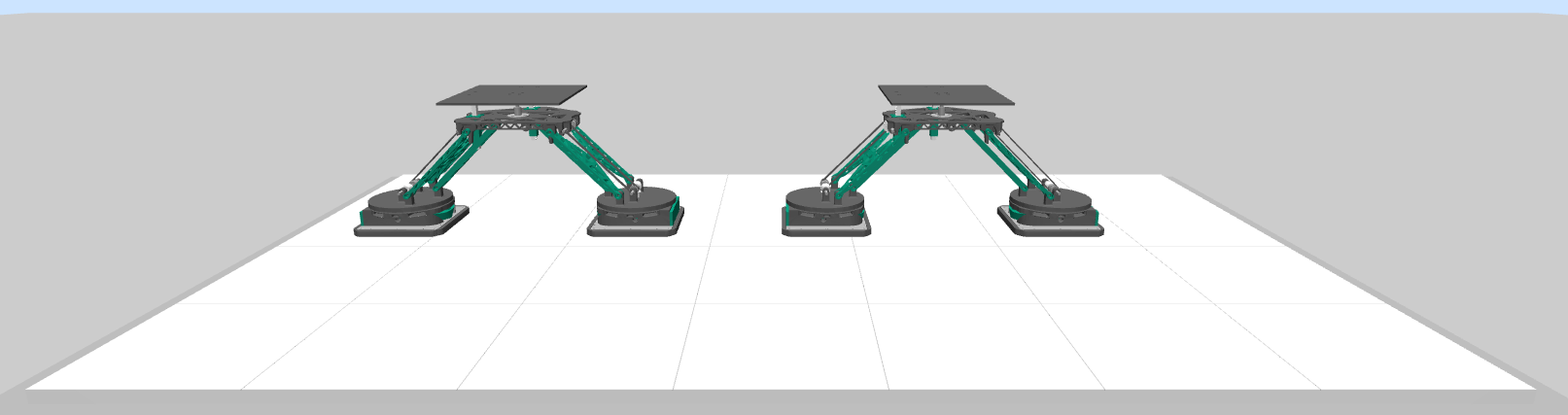
You should now see a custom example environment with two 6D-Platform MagBots:
Controlling the MagBots#
To control the MagBots in simulation and perform collision checking, add the following code to your SixDPlatformMagBotExampleEnv:
def step(self, platform_setposes: np.ndarray, num_cycles: int = 40, render_every_cycle: bool = False) -> None:
    """Perform one or multiple simulation steps, including caluclation of mover controls, MuJoCo integrator steps, rendering, and
    collision checking.

    :param platform_setposes: the desired target positions of the MagBot platforms (numpy array of shape (num_magbots, 6) using Euler
        angles (xyz) in rad)
    :param num_cycles: the number of control cycles for which to apply the same controls, defaults to 40
    :param render_every_cycle: whether to call ``render()`` after each integrator step in the ``step()`` method, defaults to
        False. Rendering every cycle leads to a smoother visualization of the scene, but can also be computationally expensive.
        Thus, this parameter provides the possibility to speed up training and evaluation. Regardless of this parameter, the scene
        is always rendered after ``num_cycles``.
    """
    assert platform_setposes.shape == (self.num_magbots, 6)

    for _ in range(0, num_cycles):
        # calculate controls
        # platform set pose to mover set pose
        mover_poses = self.magbots.platformSetPose2MoverSetPose(
            platform_pose_d=platform_setposes, mover_z_d=self.initial_mover_zpos, use_euler=False
        )
        # update controls for mover impedance controllers
        mover_poses_tmp = mover_poses.reshape((self.num_movers, 7))
        for idx_mover in range(0, self.num_movers):
            self.impedance_controllers[idx_mover].update(
                model=self.model,
                data=self.data,
                pos_d=mover_poses_tmp[idx_mover, :3],
                quat_d=mover_poses_tmp[idx_mover, 3:],
                additional_mass=self.magbots.magbot_masses[0] / 2,
            )
        # coupling: mover rotation <-> platform rotation
        current_mover_poses = self.get_mover_qpos(mover_names=self.mover_names, add_noise=False)
        self.magbots.control_platform_ab_rot(
            model=self.model,
            data=self.data,
            mover_a_quats=current_mover_poses[self.indices_mover_a, 3:],
            mover_b_quats=current_mover_poses[self.indices_mover_b, 3:],
        )
        # integration
        mujoco.mj_step(self.model, self.data, nstep=1)
        # render every cycle for a smooth visualization of the movement
        if render_every_cycle:
            self.render()
        # check wall and mover collision every cycle to ensure that the collisions are detected and
        # all intermediate mover positions are valid and without collisions
        wall_collision = self.check_wall_collision(
            mover_names=self.mover_names,
            c_size=self.c_size,
            add_safety_offset=False,
            mover_qpos=None,
            add_qpos_noise=True,  # would also occur in a real system
        ).any()
        mover_collision = self.check_mover_collision(
            mover_names=self.mover_names,
            c_size=self.c_size,
            add_safety_offset=False,
            mover_qpos=None,
            add_qpos_noise=True,  # would also occur in a real system
        )
        if mover_collision or wall_collision:
            break
    self.render()
Again, the very basic idea should be familiar (see tutorial Applying Controls and Collision Checking in Custom Environments). The only important thing here is that we need to take care of the coupling between the mover and platform rotation.
You can now move the MagBots by specifying platform set positions by adding the following code at the end of your magbot_example_env.py-file:
if __name__ == '__main__':
    fR = 0.08  # radius of the circle
    fTime = 0.0
    platform_setposes = np.array(
        [
            [0.48 + fR, 0.36, 0.24, np.deg2rad(0.0), 0.0, 0.0],  # XYCircleZSin
            [0.36 + 0.96, 0.36, 0.2661825, 0.0, 0.0, np.deg2rad(-45.0)],  # wave
        ]
    )

    env = SixDPlatformMagBotExampleEnv()

    num_cycles = 15
    try:
        while True:
            # xy circle + z sin movement
            platform_setposes[0, 0] = 0.48 + fR * np.cos(fTime)
            platform_setposes[0, 1] = 0.36 + fR * np.sin(fTime)
            platform_setposes[0, 2] = 0.03 * np.sin(3.5 * fTime) + 0.24
            # wave movement
            platform_setposes[1, 3] = np.cos(2.0 * fTime)
            platform_setposes[1, 4] = np.sin(2.0 * fTime)
            # env step (integration, collision checking, rendering)
            env.step(platform_setposes=platform_setposes, num_cycles=num_cycles, render_every_cycle=False)
            fTime += 0.001 * num_cycles
    except KeyboardInterrupt:
        pass
    finally:
        env.close()